How to dry filament.
Bad prints often have nothing to do with your slicer settings. The filament is wet. Moisture turns to steam in the nozzle and ruins the surface, the layer bonds, and the stringing. Dry the filament and those problems disappear. Here is how to tell if yours is wet and how to fix it.
Your filament is wet. Here is how to tell.
Know which filaments go bad fastest.
Fastest to slowest. Listed from most to least moisture-sensitive.
The three ways to dry filament.
01. Dedicated filament dryer ($30-60)
The easiest option. Set it and leave it. SUNLU, Sovol, and eSUN all make good ones. You can print directly from the dryer while it runs. No need to wait.
02. Food dehydrator
Works well if the dehydrator reaches high enough temps. Many units max at 70°C. Fine for most materials. The key check: measure if a standard 1kg spool fits inside before buying. Some smaller dehydrators cannot fit a full spool without removing a shelf tray. Run at the same temps listed above. 4 to 6 hours is usually enough for PLA, PETG, and ABS. Nylon needs more time.
03. Household oven
This works but requires care. Most ovens do not hold temperature accurately below 100°C. The actual temp can swing 10 to 15°C above or below the dial setting. PLA will soften and warp if the oven runs hot (PLA deforms at 60°C).
If using an oven: verify temperature with a separate digital oven thermometer before putting filament in. Crack the door slightly for airflow. Not recommended unless you have confirmed temperature accuracy. For Nylon and TPU, use a dedicated dryer instead.
Keep it dry between prints.
Drying fixes the problem, but only until the spool absorbs moisture again. Proper storage keeps filament dry between uses.
Does this spool need drying?
Pick your material. Everything this returns is the same figure printed on that material's own page, so it will never tell you something the profile does not.
Choose a material and the answer appears here.
What you actually need
Four things cover every drying and storage case on this page. Each one is listed with the specification that decides whether a given product will do the job, because that is the part product titles tend to omit.
Filament dryer
Must reach 70C to cover nylon
A unit that stops at 55-60C will dry PLA and little else. Nylon needs 70-80C for 12 hours or more, so 70C is the floor worth buying and anything higher is margin. Maximum temperature is the specification that decides whether a dryer is worth owning, and it is usually buried in the spec sheet rather than the product title.
See filament dryer on AmazonHygrometer
Small digital unit that fits in a storage box
The cheapest way to stop guessing. If the box reads under 20% relative humidity the filament inside is fine, and you can skip a drying cycle you did not need.
 TempPro · Digital hygrometerSmall enough to sit inside a storage box, which is the only place the reading matters
Airtight storage with rechargeable desiccant
Sealed container plus indicating silica gel
Drying a spool achieves nothing if it then sits on an open shelf. Indicating desiccant changes colour when spent, and recharges in an oven at 120C for an hour, so it is a one-time purchase.
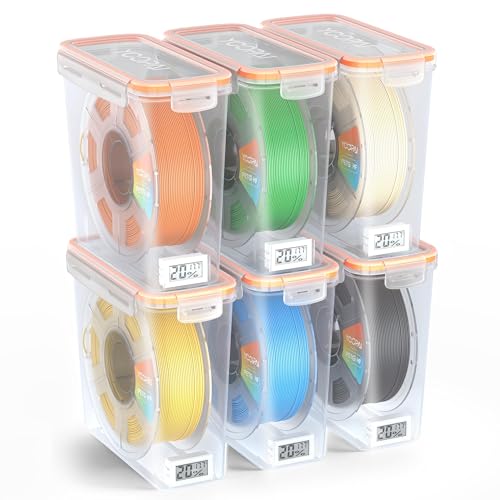 YOOPAI · Filament storage box with humidity monitorSealed box with a built-in humidity readout, so the storage can be verified
Vacuum storage bags
Valve type, sized for a 1 kg spool
For spools you will not touch for months. Removing the air entirely beats desiccant alone for long-term nylon and TPU storage.
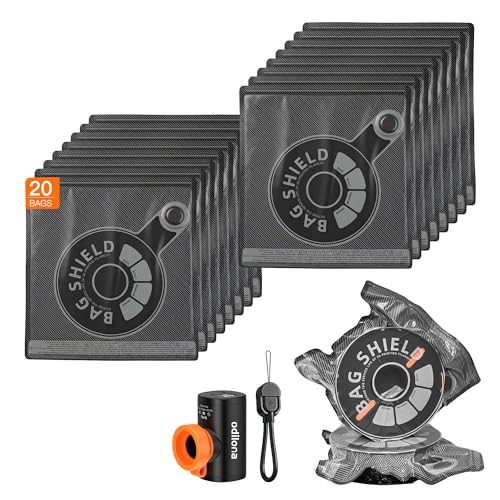 Odilona · Filament vacuum storage bags with pumpSized for 1 kg spools generally, with no printer-brand fit claim
As an Amazon Associate we earn from qualifying purchases. Links above are affiliate links, and using them costs you nothing extra.
Some materials need an oven, not a dryer.
Everything above assumes a filament dryer topping out around 80°C, which covers every material most people print. It does not cover the high-temperature engineering materials. PEEK needs 120 to 150°C for three hours or more, which is a laboratory oven, not a spool warmer.
If you are drying one of those, do not buy a filament dryer and hope. Check the PEEK, PA-CF and polycarbonate pages for the actual requirement first.
Need the part now, without another test print?
If you have spent the evening tuning and the deadline has not moved, having it printed is a legitimate answer. Upload the model and see a price before you commit.
FDM only, up to 220mm per side, shipping within the United States. Accepts STL, 3MF, STEP, OBJ.
Get a printing quoteOwnership: 3DPrinterOnDemand is Another Anvil Road property, so we have a commercial interest in it. We are not recommending it as an independent party, and where it cannot print a material we say so and point elsewhere.
Keep the drying numbers by the machine.
Every material on this page is on our printable settings guide, including the drying temperature and time each one needs. Print it, keep it by the machine, and note the date you opened each spool on it. A logging app is in development and we will say so here when it ships.
Get the free field guide